Showing posts with label hardware review. Show all posts

Thursday, May 15, 2014

ZTE Open C (Hardware Review)

Woo hoo!

I just got my ZTE Open C from eBay and I'm very happy with it. This is my third Firefox OS phone and so far it is really great. I wanted something I could try to use, as opposed to something I could program. I'll be running it through its paces, but so far I'm extremely happy with the $99 unlocked price I paid to the ZTE store on US EBay.

Why is this cool? It seems faster than the ZTE Open I have. The official Mozilla specs are at https://developer.mozilla.org/en-US/Firefox_OS/Developer_phone_guide/Phone_specs#Device_specifications. From those it looks like the specs are the same as the Geeksphone Peak, but I'm investigating that a little more.

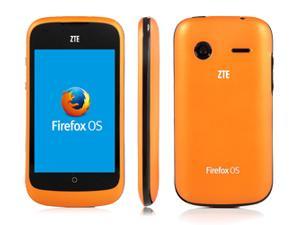
It looks like this:


The Geeksphone Peak has this processor: Qualcomm Snapdragon S4 8225 and the ZTE Open C has this one: Qualcomm MSM8210 Snapdragon. If someone wants to tell me the difference, that would be cool. What is cool about the Open C is that it has very similar specs to the "Flame" Firefox OS reference device. Same processor, anyway.

Of course the first thing I did was to hook it up to my PC and fire up App Manager. Here are a few screen shots. Oh, I forgot to say that the Open C comes with Firefox OS 1.3 out of the box! And when I hooked it up to my 64-bit Windows 7 box, it had more drivers than the one or two the earlier phones had. Here's a snap of the drivers that Windows Update found for me.


Getting Windows Update to do all of that is downright amazing. Someone has a friend in Redmond!

So here are a few screens showing off version 1.3 of Firefox OS.

Here is the home screen:

N

Those icons at the top take you to selections of relevant apps. I don't know how they are chosen, but I'm sure people will care about them.

At the bottom you see the usual suspects: phone, address book, messages, browser, and radio.

The next screen looked like this:


The usual suspects: camera, gallery, email, calendar, twitter, facebook, settings, and marketplace.

There was a third screen:


This one had music, video, clock, notes, usage, here maps, and ... SOFTWARE UPDATE. 

If you click on that, here's what you get:


I guess ZTE learned their lesson and now there's a button on the screen to update when version 1.4 is ready to go. Thank you! After all the suffering we all did to update the original ZTE Open to anything beyond 1.0, it's nice that they're starting out at 1.3. 

One other cool thing (of many) that I just discovered is that the Notes app connects to Evernote! Very easily, too. By the way, all I had to do was drop in a spare SIM card and add a 16GB SD card, and I was ready to go. 

By the way, when I plugged it in, Windows recognized the device and showed me this:


The first drive is the 16GB SD card I put in (okay, everybody lies about memory) and the second drive is what ZTE considers as memory you can use for music, video, pictures, etc. I had a choice about which drive to use but I chose my external SD card for all my music, etc.

Here's some of the music I downloaded right away:


A prize for anyone who knows where those songs are from!

I've got plenty of room for storage:


I then ran my app that looks at inner and outer dimensions and here is what it produced:


However, alert readers will notice that those numbers don't match the numbers in the spec at Mozilla I cited at the top of this page. J. Ryan Stinnett pointed me to the article at https://developer.mozilla.org/en-US/docs/Mozilla/Mobile/Viewport_meta_tag#A_pixel_is_not_a_pixel. I will need to digest this article and see if there's some way I can make apps that use these different "pixels". My app works just fine and the ball bounces around the edges, but it sounds like if I use viewport, I can get a bigger super-pixel screen. 

So far, the ZTE Open C is definitely a winner ... especially at $99. Get yours today from http://item.ebay.com/291125433026. Right now when I went to check, it said 332 had been sold and 8 people had bought this in the last 8 hours. They're having a 5% off sale if you buy 2! In case you're worried, the seller, ZTE_US, has a 99.% rating, which is great!

I'll be trying out more apps and doing more comparisons of the ZTE Open C and the Geeksphone Peak in the next few days, so stay tuned, but not iTuned!

Friday, January 17, 2014

APC Rock (Hardware Review)

I'll add more bits about this as I discover more, but the Fox has landed!


I had a little trouble yesterday because all I had was a VGA cable, but today I managed to find a HDMI to DVI and when I turned it on, the above screen appeared. It's the Firefox OS lock screen for PC. (Don't know if that's the official name.)

Swipe with your mouse to get this:


And again for the next screen.

How cool is that? The picture is a little fuzzy because I took it with my Geeksphone Peak.

I don't know how to take screen shots or even load an app on to this and I don't have WiFi hooked up, but the Fox has defnitely landed!

And a bargain at $59 US. Their site says $79 but that's a mistake. They answer email! And the shipping was fast (and I think maybe another $25 from Taiwan to the Seattle). Who are they? Why, this wonderful device is called the ASR Rock and it is made by the folks at VIA. I've known about VIA for several years and have a few computers made by them. Their specialty (among others) is making x86 Intel-compatible chips. The computers I had were about the size of a hardcover book and they sell this board for $99 with a book-like enclosure.

If you want to know more, check out http://apc.io/products/rock/. Essentially this is a single-board computer that is about the size of a phone. It comes with a power supply and not much else. But it does come with Firefox OS and a metal shield to fit inside a computer case. The board is compatible with the Neo-ITX form factor, which  is compatible with Mini-ITX and MicroATX. (That's geek for small form factor cases.) The board is bigger than a Raspberry Pi but very similar in concept except it boots Firefox OS! All I did was plug in the power, plug in the HDMI, plug in a USB keyboard and mouse, and I now have a Firefox OS PC and two Firefox OS Phones (ZTE Open and Geeksphone Peak).

This Changes Everything

A few days ago, Andre Jaenisch wanted to know why I was using absolute positioning when this isn't considered (by many) to be a best practice. I'm so used to doing this that I needed to think more about this.

Absolute positioning was needed the way I was using text elements mixed with SVG. One of the fundamental issues of writing games in a browser is that you have to be very aware of the display flow of the elements in a browser. Usually what you type is what you get, but once you start calculating and mixing different kinds of elements, you have to be careful. In that example, I had put the text in the body and then the SVG in the JavaScript code. It looked great in the desktop browser, but on the phone the bottom half of the SVG pane was cut off. The Head and Paragraph elements had pushed it down!

The answer was to take the text elements out of the browser flow and slap them down on top of the SVG pane, which was meant to take up the whole phone screen. So that's why I did it there, but now my head is spinning, realizing that the game is changing.

When I started a few months ago, it looked like the phone would be the main outlet for Firefox OS, and the screen size was the same for the first few phones. So I targeted that, never dreaming that those speedy Firefox boys and girls were working day and night behind the scenes to bring more goodies.

So now the Firefox OS PC (is it a PC? The chip is VIA ARM (no Intel here) but it can fit in a PC box and use PC peripherals. How soon will I be writing my blog on that?

And just last week the Firefox OS tablet was announced and the first tablets are now being tossed around at Firefox towers in the UK, courtesy of Foxconn (is this the beginning of the Fox conspiracy?)

What next? Laptops? FoxBooks? FoxWatches? Where's my Fox Toothbrush?

Anyway, Andre, I'll now think about making responsive games. Right now I'm concerned with making very simple games that show basic principles, so I don't want to add any extra of anything. I'm not teaching computer science, I'm showing how to make some games for Firefox OS. Same reason I use globals -- they make the code more efficient for small games. But in a big game with many screens, globals might not be a good idea, and name spaces are very important (SVG uses namespaces).

But now I am thinking about it. A game like PaddleFox would be easy to adapt, but an RPG might be more difficult. Responsive design is growing very fast and SVG can be part of it. But there's an even newer slant called adaptive design that is somewhat similar but instead of just changing the width and height, it displays different information depending on the device. So your watch gets one set of data and your Firefox OS PC gets another. Something to think about.

Now to get back to getting the wireless running on my APC Rock!

Monday, January 6, 2014

Geeksphone Peak (Hardware Review)

This weekend I received my Geeksphone Peak, a step up from my good old ZTE Open, both Firefox OS phones. I'm very excited about this!


Mine is black on the front and white on the back. It's beautiful and fast. After shipping from Madrid, my new phone cost me $244 vs $79 for my ZTE Open.

From my point of view (Firefox OS Game Developer), the Peak is worth it! Here is the reason:


Room to move!

I now have 1.8GB for applications and 1BG for media storage. This is with no SD card installed. If I install an SD card,  the media storage bumps up to whatever my card has.

My ZTE Open only had 150MB of storage. That was fine for apps, but if I loaded a few of my own code programs (not zipped), I would run out of memory fast! Essentially I could only test one of my own apps at a time. Not good! So right now, I have about 12 times the app storage I had, so I can have lots of games and two or three of my own apps and still have room to move!

Memories are Made of This

I didn't understand what the memory meant, because everyone on Twitter told me I couldn't have 1.8GB of memory. Because I am new to phones, I didn't understand how memory works, but now I do, thanks to several helpful people.

When people talk about memory on a phone, they are talking about RAM, which is the fast memory that apps are stored in when they run, and is (probably shared) with the operating system. It turns out that even though I can't see it, my Peak has a RAM memory of 512MB. The ZTE Open only had 256MB. This memory isn't Application Storage or Media Storage. It's just memory, commonly known as RAM, and you can think of this as similar to the RAM on your computer (for example, the computer I'm typing this on says it has 9GB of RAM (64-bit Windows)) and is fairly speedy as a Windows computer.

What is so cool about my new Peak is that by having twice the RAM memory, it runs fast. I was prepared for my ZTE Open to run slow. I only paid $79 for it and I was happy that it ran at all. But it would take a minute for things to load, shut down, surf the web, etc., in its 256MB memory. But now my Peak, with 512MB of memory, is fast and isn't noticeably different from my Android Galaxy Note II or my iPhone 4.

I thought the Application Storage was RAM but it isn't. Both Application Storage and Media Storage are not RAM, they are Flash memory, similar to a USB memory stick. Not super slow, but who cares? The action is in the RAM, but being able to have 12 times the applications is really great for me. Woo, hoo!

Anything Else?

The Peak is larger. I haven't measured it, but it seems like it might be almost twice as large as the ZTE Open, though smaller than my Galaxy Note II (but larger than that tiny iPhone 4).

Oh, and an important difference. My Peak had an OS update when I turned it on the first time and right now I'm at Boot2Gecko 1.1.1.0hd-GP and I've been told that I can update this phone, unlike the ZTE Open which seemed perpetually stuck at 1.0.

This is a Peak, by the way, not the rumored Peak+.

And it was interesting to unpack it. It had a plug that looked like this

The two prongs were round and won't fit in my USA sockets, but I had a similar one that was USA standard and it had the same USB plug in the side that then I could plug in a USB cable that had a USB micro plug on the other end. 5 volts DC. It works!  No worrying about voltages. Everything is just 5 volts DC. What a wonderful world!

Everything else was standard. I plugged in a micro-SD card, plugged in a SIM card I had lying around, turned it on, answered a few standard questions, and ... Bob's your uncle, it all worked, right out of the box.


Don't Hate Me Because I'm Beautiful

I still love the ZTE Open for two reasons:

1. I will test any serious programs to make sure they run on the most-minimum platform. There are other folks out there with ZTE Opens and it is a perfect test platform.

2. Now that my Peak is my main computer, I'll risk updating the ZTE since I can afford to mess it up and take time to un-brick it later. I couldn't risk it when I wanted to keep producing this blog. I am very appreciative of the ZTE Open since it helped me to write 60+ blog posts and track down some interesting bugs with Firefox OS.

The ZTE is beautiful because it was only $79 and I could get it fast on eBay in the US. It's not like I can walk in to a phone store and buy it. The best thing I can say is that all the features work, I learned a lot about using a Firefox OS phone, it does phone calls, surfs the web, plays music, plays games! And lets me write programs in HTML5 and run them on it.

The Peak does all the same stuff, but does it faster and holds more apps. Other than that, it is the same wonderful Firefox OS, and I look forward to see what else Firefox OS will do.

I'll write more about that soon, because today (because of CES), there were announcements about more Firefox OS phones, a Firefox OS TV from Panasonic, Firefox OS tablets, and a cool Firefox OS pc that fits inside a book. It's called the APC Paper and it costs a whopping $100. Here's what it looks like from the top:


There's a PC in there and it runs Firefox OS. It's the size of a book, in case you wondered.

Here's what the back looks like:


It's got the usual USB, networking, HDMI, power, etc., I/O and reminds me a lot of the Raspberry Pi computer which is popular in the UK as a way to teach kids about computers. I have one of those too and they are cool, but not as cool as Firefox OS. Instead of Linux and Python, you can play with HTML5 inside your APC Paper!

I couldn't resist, and bought (again for $79) the innards of the APC Paper, which is called the APC Rock. (Okay, so when does the APC Scissors come out, and how far beyond that will be Lizard and Spock?)

Here's what the Rock looks like, with no case but standard I/O and the same power supply that phones use (5V).


As a retired engineer, this is a thing of beauty, especially since, unlike the Raspberry Pi, this board is designed to fit inside a standard Mini-ITX and MicroATX PC case. So I will soon have a Firefox OS PC and of course you'll be the first to hear about my adventures with this and maybe even a comparison with the Raspberry Pi.

I wouldn't necessarily recommend that you go out and buy this unless you are a hardware hacker or, on the other hand, if you've been working with the Raspberry Pi and are comfortable with those wires hanging out, give it a try. The Pi is $35, so the Rock will be approximately twice that. I'm not sure where APC is located, but there was some quick flash of VAT when I was ordering it (I didn't pay VAT, but I saw it somewhere in the background, so it might be located in the EU or who knows, these days. My guess would be that or Taiwan.)

By the way, in case you are curious, there's one other cool thing about these new APC devices besides running Firefox OS. APC was a project to create a $49 Android PC. They have one, but I have enough Androids, thank you. What is cool about this is that the design and chips for this are created by a company called VIA. You may never have heard of them, but I have, and I have a few VIA PCs lying around in a closet somewhere. You can find out more about Rock and Paper at http://apc.io/

You've heard of Intel, and you've probably heard of their rival, AMD. But there is a lesser-known Intel-compatible CPU manufacturer called VIA. And VIA owns APC. So this computer is not only a small PC, it is one that runs open source Firefox OS, open source Linux (underneath), and not-open-source but not Intel, CPU!

This is an incredible time to be working with Firefox OS. Stay tuned, but never iTuned!

Thursday, October 17, 2013

Problems with ZTE (Hardware Review)

Interesting blog from Rephael Martinez on his problems with the Firefox OS ZTE Open phone: http://opensauces.wordpress.com/2013/10/16/my-journey-with-firefox-os/

Essentially he bought an early ZTE Open, it didn't work for him, he bought another one later, and that had problems too. Bummer!

So far I'm happy and maybe lucky. My phone works (as a phone) and I'm having fun playing games and talking about them.

Yes, I sometimes need to reboot, but the ZTE Open reboots faster than most other smartphones I've owned (and I've owned almost all of them: Palm, Windows Mobile, Windows Phone, iPhone, Android).

I like the ZTE Open because:
  1. It is a Firefox OS phone. I tried to order a Geekphone but they were always out of stock.
  2. The phone works.
  3. The battery has a fairly long life.
  4. It has enough games to keep me happy.
  5. And ... the development environment is the easiest I've ever seen!
But your mileage may vary!

If you have had experiences either way with a Firefox OS phone, let me know though a comment or email. Thanks!

Tuesday, October 15, 2013

Putting Music on your ZTE Open Phone (Hardware Review)

I like to listen to music on my phone and the ZTE Open is no exception. But just dropping files onto the folder created when you connect your phone to a computer doesn't always keep the music information, especially not the cover art.

So I poked around, tried some tag editors, and gave up. But I found a solution that works for me and may work for you if you have the following functionality:

  1. Windows - preferably Windows 7, not 8, not XP, but just plain Windows 7.
  2. MP3 files (I tried some OGG files and I couldn't get tag editor to work)
  3. Windows Media Player (it comes with Windows)
As you may guess, Windows Media Player 12 doesn't support OGG files. You can get a plugin to play OGG files, but it doesn't do the tagging and you can't sync it with your phone. But since most of my files are MP3, I'm good to go. If someone has a non-WMP player for Windows that works with ZTE Open, please let me know. Solutions on Mac and Linux are cool too, and I'll post them or you can add them as a comment.

So here's the steps.

First hook up your ZTE Open phone to a PC with a standard USB cable (little plug in the phone, big plug in a PC USB port). If this works, you'll see the ZTE OPEN as a drive in File Manager. The ZTE Open may ask you if you want to connect for remote debugging.

Get your MP3 files together. Make sure you have cover art. If you don't have it or don't want it, Firefox OS will make different colored abstract shapes which are cool too.

Load them into Windows Media Player and import an album. You want to do this from the Library pane of the Player. You get to the library by clicking on the boxes at the top right of the main player pane. Here's an album I imported from a video game soundtrack called Legend of Dungeon. Notice that it has the cover art, names of the album, artist, and a track list.

Note that the ZTEOPEN is on the left as a place where Windows Media Player (WMP) can find files.

Next, drag your album over to the right where the Sync tab is open. It should say ZTEOPEN Linux and show a bar indicating how full the ZTEOPEN is at the moment. After you drag it over to the right, you should see something like this:


Next you want to click on the "Start Sync" button at the upper right. It will chug along and you should see something like this:


The right side shows the status of the synchronization. I took this screen shot at 24% completed.

After the sync, your player should look like this:


It should say "Sync Completed". If you want to check, you can actually click on the ZTEOPEN menu at the left and open it to see the Music on the phone. At the top it says "ZTEOPEN > Music > All music" and I scrolled up so you can see that Legend of Dungeon is now on the phone and has the proper cover art, track list, etc.  (By the way, I made an error and didn't rename the tracks. They say "1. Zombie" for the track name and I should have erased all the numbering on the track names because WMP keeps track of the track number (you can see it under #). Oh, well.)

Now, unplug the phone and open the music player on it. You should see something like this (if you have the same music -- unlikely!):


The Firefox OS player has four views which are on the menu at the bottom (from left to right):
  1. Tiled view of all the music by album cover
  2. Playlist view where you can select types of album (most played, recent, etc.).
  3. Artist view - alphabetical with album covers
  4. Album view - alphabetical with album covers (pictured above)
Once in a while I had a problem with the Windows Media Player recognizing the ZTE Open. Rebooting the player makes that work.

I'll look around to see if I can find another player that works with OGG. Or other formats. According to Mozilla, Firefox OS supports these file formats:

  • .mp3
  • .mp4, m4a (encoded with H.264 or AAC)
  • .wav
  • .ogg (encoded with Vorbis or Opus)
  • .webm (endoded with Vorbis)
  • .3gp
Every operating system and browser has a different list of files it supports, but almost everyone supports .mp3 and almost no one (except Windows) supports .wma. I'm not sure who supports FLAC. I've also heard that Firefox has problems with .wav files.

Stay tunes and let me know if you can get other music synchronizing to work with other players and operating systems. Keeping Firefox OS happy with cool music is certainly my goal!

Thursday, October 10, 2013

ZTE Open Phone (Hardware Review)

I've had the ZTE Open phone in my hands almost a week and I'm happy with it. I had been trying to get a Geeksphone for months but they were always sold out. Then I saw that ZTE was selling a Firefox OS phone on eBay and NewEgg, I ordered one from eBay (cheaper and free shipping).

Here's what it looks like:


Here's the specs:

CPU 1.0 GHz Cortex-A5
Chipset Qualcomm MSM7225A Snapdragon
GPU Adreno 200
OS Firefox OS
Memory 512 MB ROM, 256 MB RAM
Support Micro SD Card, up to 32GB (No memory card include)
Screen 3.5" TFT 320 x 480 Pixels
TFT Capacitive Screen
Network 3G Network: HSDPA 850/1900
2G Network: GSM 850/900/1800/1900
Audio 3.5MM headphone jack
Supports MPEG-4 AAC (M4A), MP3, OGG and other formats
Video Supports H.264, MP4, ASP, WebM and other formats
Wlan Wi-Fi 802.11 b/g/n, dual-band
Camera Back 2 MP
Picture Formats Support JPEG, PNG, GIF, BMP and Other Formats
Dimensions 114 x 62 x 12.5 mm
Battery Li-Ion 1200 mAh battery

Package Include
1 x ZTE Open Firefox OS Mobile Phone
1 x Battery
1 x Micro USB Cable
1 x Charger
1 x personal hands-free headset (PHF) 

My Opinion (so far)

 I've owned several types of phones before and my initial impression was that it seems a bit similar to my iPhone 4. Round icons, swipe to left or right, one main button (no back button), and press on the background to float apps so you can move or delete them.

There's an app store and I'm busy loading up with apps and seeing what they have. Since Firefox OS is still new and still making big changes, I don't expect every app that I use on Android or Windows or Mac or Linux or iPhone or ...

In general it works, it didn't cost much, and I had a spare micro SD card and a spare SIM card.

You will need a SIM card for this phone. It is unlocked and you can't make a call unless you get a SIM card (standard size, like a postage stamp). You'll also need a micro SD card, but only if you want to store music or videos or pictures. There's also a slot in the back which I think will take micro SD cards, but I haven't tried it yet.

Problems

The phone doesn't feel as sturdy as my Galaxy Note II or my iPhone 4. But it is a lot cheaper, so I'm fine and so far I haven't broken it.

However, there is one problem that has surfaced, and that is that the updates from ZTE don't work and may even "brick" your phone, so don't do an update. I don't know where to check for the validity of updates, but I saw that these problems are mentioned on the Boot-to-Gecko mailing list.

But in general, I'm in love. I'll be reviewing games I get through the Marketplace and maybe even a few non-game apps that are cool.