Showing posts with label zte open. Show all posts

Wednesday, April 30, 2014

Long Lost Cousin to Responsive Design (Game Programming)

In my recent post on Responsive Design, at http://firefoxosgaming.blogspot.com/2014/04/responsive-design-game-programming.html, I noted the interesting problems with the Software Home button and how that robbed precious screen real estate from the ZTE Open. The same issues apply to other phones, but the ZTE is especially important because the screen is small.

Software Home Button

To refresh your memory, here is the ZTE Open with no Software Home button.


And here is the same ZTE Open with the Software Home button:


50 pixels lost!

André Jaenisch did some digging and discovered that this is documented on MDN.  Thank you, André!

MDN programming at https://developer.mozilla.org/en-US/Firefox_OS/Platform/Gaia/Gaia_apps/System#The_software_home_button says to use this CSS to detect and display the Software Home button:
@media not all and (-moz-physical-home-button) {
  #screen:not(.software-button-disabled) > #windows > .appWindow {
    bottom: 5rem;
  }
 }
And mentions the ability to set this in the Developer Settings here at https://developer.mozilla.org/en-US/Firefox_OS/Debugging/Developer_settings#Enable_software_home_button.

I never noticed this but somewhere when I upgraded my ZTE Open from 1.0 to 1.2, the Software Home button was enabled and I noticed it.

This button will turn out to be important when tablets for Firefox OS become available.

You don't need to worry about this, but if you want to, you can always put in that extra bit of CSS. In any case, make sure you actually detect what your screen size is and act accordingly.

Upgrading the ZTE Open to 1.3 or 1.4

By the way, if you have a ZTE Open, André also dug up some links on how to upgrade the ZTE Open to Firefox OS version 1.3 or 1.4. Again, thank you, André!

Upgrade to Firefox OS 1.3 at http://www.gizbeat.com/4223/how-to-build-firefox-os-1-3-2/.

Upgrade to Firefox OS 1.3 at http://blog.chellinsky.net/putting-firefox-os-v1-4-on-a-zte-open/.

Viewing Screen Sizes

I actually forgot to put in the code of how to generate the numbers you see in the screen shots above. Start out with the code from my latest CSS Shell code (adapt if you're using Canvas or SVG) at http://firefoxosgaming.blogspot.com/2014/03/son-of-css-shell-game-programming.html.

First I added a bit to the body to give the information a place to display:

  <h3>Width</h3>
    <p id="ow">Outer Width</p>
    <p id="iw">Inner Width</p>
  <h3>Height</h3>
    <p id="oh">Outer Height</p>
    <p id="ih">Inner Height</p>

Then I added this code in the section that runs after the page is loaded:

      // Get height and width.
      ow.textContent =
        "Outer Width = " + window.outerWidth;
      iw.textContent =
        "Inner Width = " + window.innerWidth;
      oh.textContent =
        "Outer Height = " + window.outerHeight;
      ih.textContent =
        "Inner Height = " + window.innerHeight;


You can also put this into console.log format. The important thing is that you know the inner and outer width and height, so you can program accordingly, but in this case, also display it so you can see what you are dealing with when looking at various devices.

Tuesday, April 15, 2014

Responsive Design (Game Programming)

One of the many reasons I like to write about game programming as well as other people's games is that often a game I review inspires me to dig deeper into game programming issues for Firefox OS. In my last post, when I reviewed Drag the Dots, http://firefoxosgaming.blogspot.com/2014/04/drag-dots-game-review.html, I noticed that one of the games overlapped the buttons at the top.


Above is a screenshot on the ZTE Open. Because the game developer had made the quit button and the time display panel semi-transparent, you could still play the game just fine, but it is a small annoyance.

Further annoying is the little-known Software Home button. See that little Mozilla fox at the bottom. That is only displayed if it is enabled in the Developer section of the settings. If you don't see it, you can enable it by going to developer settings and check "Enable Software Home button". It does the same thing that the hardware Home button does just below it. I didn't even know it was possible until I upgraded my software to version 1.2 and all of a sudden the fox was there but I didn't even notice it!

I'm sure there's a reason of the Software Home button, but it takes away precious screen area. I'm curious if there is some way in my game I can make sure this is not enabled. I'll poke around and see! But maybe it is important to have it. Anyone know?

This prompted me to go back and look at my post called How Big Am I?, http://firefoxosgaming.blogspot.com/2013/10/how-big-am-i-game-programming.html. I'm looking forward to the Firefox OS tablet, which has made me want to think about sizes and how much space you have for a game. I decided to rewrite my little program and have it display the inner and outer height and width. One thing led to another and I decided to add some new features to my CSS Shell code, http://firefoxosgaming.blogspot.com/2014/03/son-of-css-shell-game-programming.html.

Instead of using an alert, I display the values in the page itself. And here's what I have found for the ZTE Open and the Geeksphone Peak.

ZTE Open with the Software Home button:


And here's the ZTE Open without the Software Home button:


As you can see, the outer height is the same (480 pixels) but the Software Home button costs you 50 pixels, which is a large amount for such a small screen.

And the Geeksphone Peak with Software Home button:


And without the Software Home button:


Still a 50 pixel loss. But if you think about the variations of the two phones and the option of the Software Home button, the height can be as much as 620 on the full Peak without Home button and as low as 410 on the ZTE with Home button enabled. 210 pixels!

The widths don't vary, but the Peak has 360 pixels and the ZTE only has 320. Either way, the two phones definitely have a drastic difference in ratio of width to height.

What Does This Mean?

It means you need to know two things:

  1. How big is your screen? You can test this when you start up the game.

  2. Adjust your game accordingly. There are various options, depending on the game.

I'll be analying this more in the coming weeks, but I strongly recommend that if you are making a game, that you do two things:

  1. Test your game on different devices.

  2. Write code so you can adjust.

There are obvious things you can do. Write for the ZTE Open and then add some buffer space for bigger phones. It might be smart to test on the ZTE since it has less memory. You want to be prepared for low memory when that $25 Firefox OS phone comes out!

Drag the Dots

Drag the Dots is still a great game and I recommend it. Here's what it looks like on the Geeksphone Peak:


Everything fits just perfectly. Well, until that pesky Software Home button is enabled:


Oops, there goes 50 pixels!

This isn't meant to be any kind of criticism of Anders Fisher and his really cool game. Firefox OS is still in beta and some of these issues are still puzzling. My original questions about sizing started when I noticed that Candy Crush was slightly off, and those guys are a big company with lots of developers! Anders Fisher is just one guy with some really great ideas and a good color sense. I would pay for his game if he ever sells it!

New Directions

I've decided to head in a new direction with this blog. I'll still keep reviewing games and I'll be poking into the idea of Responsive Game Design, but I've decided to take the plunge and see if I can get some drag-and-drop game engines to work with Firefox OS.

My first investigations will be with Scirra's Construct 2. I've actually used that one before and even have a game I've written in it on the Chrome App Store. You can read about Construct 2 here http://firefoxosgaming.blogspot.com/2014/03/html5-game-frameworks-game-programming.html. And after that, I'm going to look at another cool engine called Stencyl that looks like it might work.

If anyone has had any experiences with Construct 2 and/or Stencyl with Firefox OS, let me know.

Thursday, February 13, 2014

ZTE Open Triumphant! (Game Programming)

I used my ZTE Open phone to test out a lot of Firefox OS code and if I hadn't been able to buy it for $79 on Ebay, I wouldn't have started this blog! All along I had wanted to buy a Geeksphone but they were never available when I had the money and when I did, they weren't. Finally Geek and I got together and I got a Geeksphone Peak and have been using that ever since. Then one day, the Firefox OS Simulator said that it wouldn't work any longer with Firefox 26+, so I had to bite the bullet and upgrade my phone if I wanted to use the vastly superior Firefox App Manager.

I had never flashed a phone and had heard all kinds of horror stories about bricking phones, but the stuff I read about upgrading the Geeksphone Peak sounded not too bad, and it wasn't. You can read all about my Geeksphone Peak and upgrading adventure here: http://firefoxosgaming.blogspot.com/2014/02/firefox-os-simulator-rip-game.html. And really, gentle reader, the Firefox App Manager is a lot better. I like how I can see the feedback as the app loads onto the phone, and it also seems a lot, lot faster transferring over the USB cable. I can also take screenshots and there's lot of other debugging things I haven't even discovered yet.

But what about my poor ZTE Open? The horror stories there were long threads of posts with no good conclusion. There was a Mozilla Hacks article that people steered me to, and I tried it, but no help. I even installed Fedora 20 on an old machine but I still got stuck and it seemed too fiddly. I then went to the B2G (Boot to Gecko) mailing list and said what I had done and what was still not working. Well, almost instantly, Ginn Chen came to my rescue with some quick advice. My main problem was that my original ZTE Open didn't have Fastboot installed and that meant it couldn't play ball with Fedora! While the Mozilla Hacks articles were really great, I didn't know how to determine if Fastboot was installed or not, and misunderstood what I had read. The Mozilla team has been very patient with ZTE and me!

I followed Ginn's instructions and combined them with the Mozilla Hacks post by Frédéric Harper and Mark Coggins at https://hacks.mozilla.org/2014/01/upgrading-your-zte-open-to-firefox-1-1-or-1-2-fastboot-enabled/.

I now have this on my ZTE Open:


And now I can use App Manager!


By the way, if App Manager can take screenshots, who takes the screenshot of App Manager in Fedora 20 LXDE? The answer is a cool program called shutter.  Just install it from Yum and you're good to go! 

So what did I do? Follow the instructions from Ginn Chen, Frédéric Harper, and Mark Coggins. I am grateful to them and the rest of the very helpful Firefox OS community. I'm not a hacker, I'm just an ordinary web programmer who likes games and game programming.

Here are the steps:

Step 1 - You Need Fastboot

For some reason, when ZTE started out with the ZTE Open, they didn't know they needed Fastboot. So the first step is to upgrade the OS from 1.0 to 1.1. Get the correct images from here: http://www.ztedevices.com/support/smart_phone/b5a2981a-1714-4ac7-89e1-630e93e220f8.html. Choose the correct image based on where you got the phone. Mine was American eBay. I downloaded it but it took a few tries to get to my machine and took a long time. Test the ZIP file and make sure you can open it. You will be using the zipped version, but the file contains a PDF that might be helpful. 

Next, copy that zip file to the root of a micro-SD card. Take the battery out of your ZTE Open and put the micro-SD card in the ZTE Open. Then put the battery back in (and make sure that no USB cable is connected to a computer. 

Once the battery is back in, press the Volume UP and Power buttons simultaneously. You should see a screen like this:


This is the famous Firefox OS system recovery screen. I can't take this screenshot, but ZTE had this in their instructions. Hopefully you don't get the yellow error messages at the bottom, because you need that card with the update.

Next, using the Volume UP or DOWN buttons, highlight the "apply update from external storage" line. Like this (again from ZTE and not exactly what I had):


Now that you're ready, press the Power button to select the option to apply the update.


Mine didn't have that much and the image loaded very fast. When I saw the message at the bottom saying "Install from sdcard complete" the option was "reboot from system now" and I pressed the Power button to select it. 

My phone rebooted and I was now in phone setup. After the usual questions, everything was fine and was now at Firefox OS 1.1 and Fastboot was my new BFF. 


But I couldn't stop there. I needed to get to 1.2!

Step 2 - Preparing Fedora

I wanted to keep using Windows for my Geeksphone Peak, so it was time to break out an old netbook and install Fedora 20 with the LXDE spin. Someone had recommended this as a Firefox friendly distribution and so far it is fine, but I'm sure other distros like Ubuntu are just fine too. I'm more familiar with Ubuntu and have been a heavy Linux user since I installed Slackware from 3 floppy disks. 

You can get Fedora 20 with the LXDE spin here: http://spins.fedoraproject.org/lxde/#downloads. Essentially Fedora is a version of Red Hat Linux that is community based. But because I had an old netbook, I used a cut-down version called LXDE (Lightweight X-Windows Desktop Environment). My netbook was an old Indamixx brand that was based on the LSI Wind computer with 2GB of RAM. The Indamix is a laptop that has Linux music software preinstalled. I didn't need it for that, so it now is my Firefox build machine!

I downloaded the ISO and used the instructions from this page to install the ISO to a USB stick. My netbook doesn't have a disk drive! http://docs.fedoraproject.org/en-US/Fedora/20/html/Installation_Guide/Making_USB_Media.html.

After installation, I installed Firefox (of course!) and Dropbox (very handy for shuffling stuff back and forth) and Shutter (for screenshots). 

I also installed the latest version of adb (Android Device Bridge) by typing:

   sudo yum install adb

This also installed fastboot.

Then I got the rest of the instructions from https://hacks.mozilla.org/2014/01/upgrading-your-zte-open-to-firefox-1-1-or-1-2-fastboot-enabled/. Which included the instructions on how to prepare my machine from this post: https://hacks.mozilla.org/2013/08/pushing-a-firefox-os-web-app-to-zte-open-phone/. Don't forget to set your phone so that the Developer option for debugging is set!

Plug the phone into a USB cable and then into the Fedora box. Type this:

   adb usb

You should get

   restarting in usb mode

Type 

   adb devices

You should get

   roamer2 device

You're now good to go. Roamer2 is the name for the ZTE Open! Much more romantic.

Step 3 - Load the New Image

Everything is prepared. Get your image here: https://www.dropbox.com/sh/rnj3rja7gd54s98/kGH6LCBRmf.  This is a Dropbox location and again, I chose the US version, not the UK version. These images and the one for 1.1 are just for the ZTE Open phones that were sold for US and UK eBay buyers and may not work for other phones. 

This time unzip the file and put the contents in a folder you can find easily. I made a folder in my home folder and named it zte. Next I plugged in the 1.1 ZTE Open with Remote debugging enabled. 
  • Phone at 1.1 with fastboot and remote debugging enabled - check!
  • ADB and FASTBOOT installed on Fedora - check!
  • 1.2 US image in a folder on my Fedora - check!
  • Fedora "sees" my phone - check!
Open up a command window in Fedora and from the folder that has the new 1.2 images, type:

  adb reboot bootloader

The phone reboots and is now ready for fastbooting! Type these commands, one at a time, while the phone is bootloading:

  fastboot flash boot boot.img
  fastboot flash userdata userdata.img
  fastboot flash system system.img
  fastboot flash recovery recovery.img
  fastboot erase cache
  fastboot reboot


Lots of stuff will happen, and watch for any errors. I didn't see any, but you want to know.

I put those 6 lines in a shell script which made it easier and less worried that I'd make a mistake.

After the last line executes. the phone will reboot and you'll be starting up a brave new world in Firefox OS 1.2.

Installing the App Manager

 This part is the easiest. Just boot up Firefox and select App Manager from the Developer menu. It will gently prompt you to install

   Firefox OS 1.2 Simulator 6.0 ...

And

       ADB Helper 0.2.1

These are Extensions to Firefox. Don't confuse this with Firefox OS Simulator 4.01, which is no longer needed (but was useful to make sure that the device was connected). And the version numbers are only valid for today and may change at any time.

You're in business! Or art or politics or anything you want as long as it is Firefox OS!

One Question

When my ZTE Open was finished booting, it had a bunch of apps on it I didn't install. Anyone know what these are or whether should keep them? They weren't on my Geeksphone Peak when that went to 1.2, and I don't know if I need them or what. Here's some screenshots that show what they look like:


And the second screen.


Well, okay, Flappy Bird and Clumsy Ninja weren't there until I installed them later. But I do wonder what these mystery apps do.

Flappy Bird isn't the original version but is an exact copy from someone else and Clumsy Ninja uses a similar idea to Flappy Bird. Because Flappy Bird has become such a phenomena and has so many clones and even a game jam http://itch.io/jam/flappyjam, I thought this might be a good subject for a simple sample showing some basic moves that you can adapt to something more interesting. My first post on this, Flying Fox, is here: http://firefoxosgaming.blogspot.com/2014/02/flying-fox-part-1-game-programming.html.

Again, thanks to the Firefox OS community and in particular to Ginn Chen, Frédéric Harper, and Mark Coggins, for making the ZTE Open now a proud member of the Firefox OS 1.2 community.

Monday, January 6, 2014

Geeksphone Peak (Hardware Review)

This weekend I received my Geeksphone Peak, a step up from my good old ZTE Open, both Firefox OS phones. I'm very excited about this!


Mine is black on the front and white on the back. It's beautiful and fast. After shipping from Madrid, my new phone cost me $244 vs $79 for my ZTE Open.

From my point of view (Firefox OS Game Developer), the Peak is worth it! Here is the reason:


Room to move!

I now have 1.8GB for applications and 1BG for media storage. This is with no SD card installed. If I install an SD card,  the media storage bumps up to whatever my card has.

My ZTE Open only had 150MB of storage. That was fine for apps, but if I loaded a few of my own code programs (not zipped), I would run out of memory fast! Essentially I could only test one of my own apps at a time. Not good! So right now, I have about 12 times the app storage I had, so I can have lots of games and two or three of my own apps and still have room to move!

Memories are Made of This

I didn't understand what the memory meant, because everyone on Twitter told me I couldn't have 1.8GB of memory. Because I am new to phones, I didn't understand how memory works, but now I do, thanks to several helpful people.

When people talk about memory on a phone, they are talking about RAM, which is the fast memory that apps are stored in when they run, and is (probably shared) with the operating system. It turns out that even though I can't see it, my Peak has a RAM memory of 512MB. The ZTE Open only had 256MB. This memory isn't Application Storage or Media Storage. It's just memory, commonly known as RAM, and you can think of this as similar to the RAM on your computer (for example, the computer I'm typing this on says it has 9GB of RAM (64-bit Windows)) and is fairly speedy as a Windows computer.

What is so cool about my new Peak is that by having twice the RAM memory, it runs fast. I was prepared for my ZTE Open to run slow. I only paid $79 for it and I was happy that it ran at all. But it would take a minute for things to load, shut down, surf the web, etc., in its 256MB memory. But now my Peak, with 512MB of memory, is fast and isn't noticeably different from my Android Galaxy Note II or my iPhone 4.

I thought the Application Storage was RAM but it isn't. Both Application Storage and Media Storage are not RAM, they are Flash memory, similar to a USB memory stick. Not super slow, but who cares? The action is in the RAM, but being able to have 12 times the applications is really great for me. Woo, hoo!

Anything Else?

The Peak is larger. I haven't measured it, but it seems like it might be almost twice as large as the ZTE Open, though smaller than my Galaxy Note II (but larger than that tiny iPhone 4).

Oh, and an important difference. My Peak had an OS update when I turned it on the first time and right now I'm at Boot2Gecko 1.1.1.0hd-GP and I've been told that I can update this phone, unlike the ZTE Open which seemed perpetually stuck at 1.0.

This is a Peak, by the way, not the rumored Peak+.

And it was interesting to unpack it. It had a plug that looked like this

The two prongs were round and won't fit in my USA sockets, but I had a similar one that was USA standard and it had the same USB plug in the side that then I could plug in a USB cable that had a USB micro plug on the other end. 5 volts DC. It works!  No worrying about voltages. Everything is just 5 volts DC. What a wonderful world!

Everything else was standard. I plugged in a micro-SD card, plugged in a SIM card I had lying around, turned it on, answered a few standard questions, and ... Bob's your uncle, it all worked, right out of the box.


Don't Hate Me Because I'm Beautiful

I still love the ZTE Open for two reasons:

1. I will test any serious programs to make sure they run on the most-minimum platform. There are other folks out there with ZTE Opens and it is a perfect test platform.

2. Now that my Peak is my main computer, I'll risk updating the ZTE since I can afford to mess it up and take time to un-brick it later. I couldn't risk it when I wanted to keep producing this blog. I am very appreciative of the ZTE Open since it helped me to write 60+ blog posts and track down some interesting bugs with Firefox OS.

The ZTE is beautiful because it was only $79 and I could get it fast on eBay in the US. It's not like I can walk in to a phone store and buy it. The best thing I can say is that all the features work, I learned a lot about using a Firefox OS phone, it does phone calls, surfs the web, plays music, plays games! And lets me write programs in HTML5 and run them on it.

The Peak does all the same stuff, but does it faster and holds more apps. Other than that, it is the same wonderful Firefox OS, and I look forward to see what else Firefox OS will do.

I'll write more about that soon, because today (because of CES), there were announcements about more Firefox OS phones, a Firefox OS TV from Panasonic, Firefox OS tablets, and a cool Firefox OS pc that fits inside a book. It's called the APC Paper and it costs a whopping $100. Here's what it looks like from the top:


There's a PC in there and it runs Firefox OS. It's the size of a book, in case you wondered.

Here's what the back looks like:


It's got the usual USB, networking, HDMI, power, etc., I/O and reminds me a lot of the Raspberry Pi computer which is popular in the UK as a way to teach kids about computers. I have one of those too and they are cool, but not as cool as Firefox OS. Instead of Linux and Python, you can play with HTML5 inside your APC Paper!

I couldn't resist, and bought (again for $79) the innards of the APC Paper, which is called the APC Rock. (Okay, so when does the APC Scissors come out, and how far beyond that will be Lizard and Spock?)

Here's what the Rock looks like, with no case but standard I/O and the same power supply that phones use (5V).


As a retired engineer, this is a thing of beauty, especially since, unlike the Raspberry Pi, this board is designed to fit inside a standard Mini-ITX and MicroATX PC case. So I will soon have a Firefox OS PC and of course you'll be the first to hear about my adventures with this and maybe even a comparison with the Raspberry Pi.

I wouldn't necessarily recommend that you go out and buy this unless you are a hardware hacker or, on the other hand, if you've been working with the Raspberry Pi and are comfortable with those wires hanging out, give it a try. The Pi is $35, so the Rock will be approximately twice that. I'm not sure where APC is located, but there was some quick flash of VAT when I was ordering it (I didn't pay VAT, but I saw it somewhere in the background, so it might be located in the EU or who knows, these days. My guess would be that or Taiwan.)

By the way, in case you are curious, there's one other cool thing about these new APC devices besides running Firefox OS. APC was a project to create a $49 Android PC. They have one, but I have enough Androids, thank you. What is cool about this is that the design and chips for this are created by a company called VIA. You may never have heard of them, but I have, and I have a few VIA PCs lying around in a closet somewhere. You can find out more about Rock and Paper at http://apc.io/

You've heard of Intel, and you've probably heard of their rival, AMD. But there is a lesser-known Intel-compatible CPU manufacturer called VIA. And VIA owns APC. So this computer is not only a small PC, it is one that runs open source Firefox OS, open source Linux (underneath), and not-open-source but not Intel, CPU!

This is an incredible time to be working with Firefox OS. Stay tuned, but never iTuned!

Friday, November 1, 2013

Bouncing a Ball with Canvas Arc - Revisited (Game Programming)

In a recent post (Bouncing a Ball with Canvas Arc) I wrote about ... duh ... bouncing a ball using Canvas and drawing the ball with the arc method.

First of all, here are better links (thanks, Robert Helmer) for the Canvas arc method:
  1. Reference: https://developer.mozilla.org/en-US/docs/Web/API/CanvasRenderingContext2D#arc%28 (note that this hangs off of CanvasRenderingContext2D, not Canvas).
  2. Guide: https://developer.mozilla.org/en-US/docs/Web/Guide/HTML/Canvas_tutorial/Drawing_shapes#Arcs (note this is part of a larger topic on drawing shapes with Canvas).
  3. From now on, I'll try to reference Mozilla Developer Network. I'm guilty of quick look ups on W3 Schools, but MDN really is the authority on Firefox!
Secondly, the post on Canvas and the arc method assumed that it is okay to erase the screen every time you move the ball. This works with some things well and the phone screen is small enough that there isn't a lot of delay. But I then thought, what about these two conditions:
  1. You have other stuff on the screen you don't erase?
  2. What if you have to do a lot of calculations to redraw something that doesn't need to be done?
 So I remembered a technique I learned from programming 8-bit games (Apple II, Commodore 64, etc.). There it was simply:
  1. Draw something.
  2. Calculate the move.
  3. Erase the thing you want to move.
  4. Draw the thing in its new position.
 Easy to do, right? Draw the ball in Fuchsia, calculate new position, erase the ball by drawing it with White, and then draw it again in its new position with Fuchsia. What could be simpler? (Well, it seemed simple at the time.)

So here's the code:

<!DOCTYPE html>
<html>
  <head>
    <meta charset="utf-8">
    <title>
      Canvas Bounce Draw Circle and Erase
    </title>

    <script>
   
    // Global variables
    var canvas;
    var ctx;

    var boardWidth = 320;
    var boardHeight = 460;

    var ballHor = boardWidth / 2;
    var ballVer = boardHeight /2;
   
    var oldHor;
    var oldVer;

    var changeHor = 10;
    var changeVer = 10;

    // Listen to that page load!
    window.addEventListener("load", getLoaded, false);

    // Run this when the page loads.
    function getLoaded(){

      // Make sure we are loaded.
      console.log("Page loaded!");
 
      // Load the image and the canvas.
      loadMyImage();

      // Start the game loop.     
      gameLoop = setInterval(doMainLoop,16);
    }

    // This will run every 16 milliseconds.
    function doMainLoop(){
 
      // Move the ball.
      ballMove();
    }

    function ballMove() {
     
      // Changes are calculated but do not
      // take effect until next time through loop.

      // Get the old ball coordinates.    
      oldHor = ballHor;  
      oldVer = ballVer;

      // Erase the ball where it is now.
      // Color is White.
      ctx.lineWidth = 0;
      ctx.beginPath();
      ctx.arc(oldHor, oldVer, 10, 0, Math.PI * 2, true);
      ctx.closePath(); 
        ctx.fillStyle = "White";
      ctx.fill();
              
      // Calculate new vertical component.
      ballVer = ballVer + changeVer;

      // If top is hit, change direction.
      if (ballVer + changeVer < -10)
        changeVer = -changeVer;
       
      // If bottom is hit, reverse direction.
      if (ballVer + changeVer > boardHeight - 10)
        changeVer = -changeVer;

      // Calculate new horizontal component.
      ballHor = ballHor + changeHor;

      // If left edge hit, reverse direction.
      if (ballHor + changeHor < -10)
        changeHor = -changeHor;
       
      // If right edge is hit, do something.
      if (ballHor + changeHor > boardWidth - 10)
        changeHor = -changeHor;     
   
      // Draw a ball using canvas arc function.
      // Color is Fuchsia.
      // Make the radius one pixel smaller.
      ctx.beginPath();
      ctx.arc(ballHor, ballVer, 10, 0, Math.PI * 2, true);
      ctx.closePath();
      ctx.fillStyle = "Fuchsia";
      ctx.fill();    
    }

    // Load the image and the canvas.
    function loadMyImage() {

      // Get the canvas element.
      canvas = document.getElementById("myCanvas");

      // Make sure you got it.
      if (canvas.getContext) {

        // Specify 2d canvas type.
        ctx = canvas.getContext("2d");
      }
    }

</script>

</head>
<body bgcolor="White">

  <canvas id="myCanvas" width="320" height="460">
  </canvas>

</body>
</html>


This is nearly the same code as last time, with these few small changes:
  1. I added temporary variables to track the previous positions of the ball.
  2. In the ballMove section, I added erasing the ball.
  3. The main loop (doMainLoop) no longer clears the screen every time.
Erasing the Ball

This code erases the ball:

      // Get the old ball coordinates.    
      oldHor = ballHor;  
      oldVer = ballVer;

      // Erase the ball where it is now.
      // Color is White.
      ctx.lineWidth = 0;
      ctx.beginPath();
      ctx.arc(oldHor, oldVer, 10, 0, Math.PI * 2, true);
      ctx.closePath(); 
      ctx.fillStyle = "White";
      ctx.fill();


It is nearly the same as drawing the ball, but the fillStyle is White. The old ball position is created and used to erase where the ball was drawn.

But Wait! Something is wrong!

When I ran this code, it looked like this in the Simulator:


And it looked like this when I pushed it to my ZTE Open phone:


I'm hoping that the picture is clear enough to show that the bouncing ball is leaving a trail of ghost shapes behind it. Well, it was Halloween, but I'm not sure that would account for the behavior today.

The ball bounces all right, but its not cleaning up after itself. I did some research and it turns out that when you draw on Canvas, the pixels get scattered a little too far and you get artifacts that can cause problems. This is called aliasing, and is often a problem with drawing shapes onto a screen. And this is why many people recommend clearing the canvas every time you move an object.

There are two solutions I have found:
  1. You can erase part of a screen by using context.clearRect ( x , y , w , h ); You can do this to clear a specific rectangle at x,y with a width and height.
  2. You can overlap the drawing a little to get rid of the spilled pixels.
I like the second because it is more precise. I want to erase just the part I want. So the solution is simple. When you draw the ball, use 9 instead of 10 in this line:

      ctx.arc(ballHor, ballVer, 10, 0, Math.PI * 2, true);

so it reads:

      ctx.arc(ballHor, ballVer, 9, 0, Math.PI * 2, true);

The ball is slightly smaller, but all of it gets erased. I'm not happy with this, but I looked and saw that this isn't a bug, it is a feature of not only Firefox, but Chrome and IE. Throwing pixels around is a bit imprecise, and that's one of the reasons I'm not 100% happy with Canvas. But it works with lots of stuff. I'm still more happy CSS. See my Bouncing a Ball in CSS topic. I'll come back to CSS later, but there's still a few more things to look at with Canvas.

Programming Tip

When you install an app to the ZTE Open, there is a delay of a few seconds before you get a message telling you the app is installed. And you'll have to reboot the ZTE Open before you can see your app's icon.

Also, screenshots are still tricky. You have to hit two buttons at nearly the same time. But I'm learning how to do this. I was sending the screenshots to myself from the gallery with my email, but I figured out I could use the cable to download the screenshots from a folder named screenshots. There's a short delay before the screenshot appears in the gallery. However, if you want to take a screenshot, you must unplug the cable first. A little annoying, but liveable. This is a version 1 of an new product that never lived before, so the baby steps can be amusing and appealing.

Thursday, October 24, 2013

How Big Am I? (Game Programming)

My review of Candy Crush made me think that one of the first things I want to do is see how much room I have in my new house (the ZTE Open Firefox OS phone). Often games need fixed sizes, and it is a good idea to know how big your screen really is. The Candy Crush guy had a great game, but it was a little too big for the phone.

If your app is mainly text based, you can just let the type flow wherever it wants. But games almost always need specific items in specific places. So it is important to know exactly what size your game board is!

I wondered about this, and so I wrote a small app and found some answers.

I used the innerWidth, outerWidth, innerHeight, and outerHeight properties of the HTML DOM window object. This is supported in Mozilla, so we know we are good to go: https://developer.mozilla.org/en-US/docs/Web/API/window.innerWidth.

Here's what these properties do:

innerWidth = width of the viewport (not including scrollbars and chrome)
outerWidth = width of the whole window (includes scrollbars and chrome)
innerHeight = height of the viewport (not including scrollbars and chrome)
outerHeight = height of the whole window (includes scrollbars and chrome)

Chrome is not a browser name; here it means the stuff that surrounds the actual content of your page. Usually there is more chrome at the top and bottom (menus, notifications, etc.). You care about the inner parts because that's where your game takes place.

So I wrote a web page that looks around from the inside and tells us what it sees.

<!DOCTYPE = html>
<html>
<head>
<meta charset="UTF-8">
<meta name="viewport" content="width=device-width,
  height=device-height, user-scalable=false;">
<title>Hello Firefox</title>
<script>
w = window.outerWidth;
w2 = window.innerWidth;
w3 = w + " " + w2;
h = window.outerHeight;
h2 = window.innerHeight;
h3 = h + " " + h2;
howBig = w3 + " " + h3;
alert(howBig);
</script>
</head>
<body>
<h1>Hello</h1>
<p>This is a hello page.</p>
</body>
</html>


 Most of this is straight HTML5 stuff. Firefox OS likes UTF-8 so I put it in.

Next I added the viewport information. That just tells the page to make the page the same size as the device width and height, and won't let the user modify the page size. We want our window to fit snugly into the screen of the ZTE Open.

Next, I wrote some simple code that gets the inner and outer widths and heights so I could see what happens.

So then here comes the cool part. I ran this code in the Firefox OS Simulator and here's what I got:

What this tells me is that the inner width and height in the simulator is 320x460. There's chrome at the top and bottom, but not that much.

Next I pushed it to the ZTE Open and took a screen shot:


As you will notice, the inner height and width on the ZTE Open is the same as the simulator: 320x460. However, the chrome is a bit more. The width is an additional 26 pixels but the height is a less because there isn't the Firefox browser chrome that the simulator uses (that's the part that says "Firefox OS Simulator" in the first screenshot and has the three buttons at the top right).

The point of all this is that the simulator still tells you the inner dimensions of the screen on the phone (320x460) which is what the specs say. But this is the inner screen dimensions and corresponds to the viewport size. So when designing your app for Firefox OS, make sure you check what screen real estate you have. Especially as new phones and tablets come out, find out what room you actually have.

Why? Well, if you know how big something is, you can juggle things around to make them fit. When Android and iPhone came out, their screen sizes were "standard" but they quickly changed as various new phones came out with different sizes. Checking this out will make your life easier!

My two favorite sayings for programming are:

Trust No One

and 

The Truth is Out There

Both from the X-Files, but they apply to programming. You must test everything yourself and never assume that something written is true. But, on the other hand, if you search long enough, you'll get the right answer.

Maybe one of the best reasons to play around with this is that you can write the same app for the Firefox OS phone and have your app run in a Firefox browser. And maybe if we're very good little children, we'll get to play with a Firefox OS tablet.

Wednesday, October 23, 2013

Pushing Your Game to Your Phone (Programming)

Earlier this month I wrote about how easy it was to create a Firefox OS program at http://firefoxosgaming.blogspot.com/2013/10/firefox-os-easier-than-before.html.

I should have added another step, which is also very easy. Putting your app on your phone.

Here are the steps.

  1. Write your app.
  2. Connect your phone to your PC with a cable.
  3. Fire up your Firefox OS Simulator.
  4. Make sure your phone allows remote debugging*.
  5. If all is well, the simulator should say Device Connected.
  6. Click on the Push button.
  7. That should do it.
You should see your app icon on one of the screens that shows which apps are loaded.

HOWEVER, if you have a ZTE Open phone (or maybe something else early), you may need to reboot before you see the icon. I'm sure this will be fixed and this isn't a problem if you are downloading apps from the Firefox Marketplace.

Here's my beautiful app sitting next to other (better) apps:


My app is the light blue at the lower left that is titled "Hello FFOS" and has the word "Hello!" written on the icon. Pretty cool, huh?

Soon, maybe, an app that I can push to the Marketplace. But first I need to build one and you can watch me (and tell me I'm doing it wrong).


Thursday, October 17, 2013

Problems with ZTE (Hardware Review)

Interesting blog from Rephael Martinez on his problems with the Firefox OS ZTE Open phone: http://opensauces.wordpress.com/2013/10/16/my-journey-with-firefox-os/

Essentially he bought an early ZTE Open, it didn't work for him, he bought another one later, and that had problems too. Bummer!

So far I'm happy and maybe lucky. My phone works (as a phone) and I'm having fun playing games and talking about them.

Yes, I sometimes need to reboot, but the ZTE Open reboots faster than most other smartphones I've owned (and I've owned almost all of them: Palm, Windows Mobile, Windows Phone, iPhone, Android).

I like the ZTE Open because:
  1. It is a Firefox OS phone. I tried to order a Geekphone but they were always out of stock.
  2. The phone works.
  3. The battery has a fairly long life.
  4. It has enough games to keep me happy.
  5. And ... the development environment is the easiest I've ever seen!
But your mileage may vary!

If you have had experiences either way with a Firefox OS phone, let me know though a comment or email. Thanks!

Fruit Quest! (Game Review)

Sometimes you're the bug and sometimes you're the windshield. In this case, the bug hit the windshield, bounced off, flew back again, and got smashed up pretty good.

With a name like Fruit Quest!, I wasn't sure if this was about slicing fruits, a slot machine, or three-in-a-row. I think it is a match-three game, but I don't know.

Strike 1: When the game booted up, it wanted me to log in to Facebook. With no option otherwise, So I thought about it, and said okay, and then went through a series of dialogs. At least they were nice enough to ask if I would let them post to my Facebook and I said no!

Strike 2: But then, when I was finished doing all that, this is what came up on the screen.


And that's all I got, no matter what. So my guess is that this game wasn't targeted at Firefox OS Phones and isn't responsive to the ZTE Open phone screen size. I haven't had this problem before with a game, so I don't know the story. 

All I know is it didn't work. This game looks like it is also available on iOS and Android, but it isn't quite ready for prime time here, even if it is in the Firefox OS store. 

Strike 3: It looks like it is free but on the other platforms, it looks like it is free but they'll offer you the choice of paying more if you want to continue playing. I know that's a big trend, but I don't like it. I'd much rather have a trial and then pay if I want the full version!

So three strikes, and I think this means I have to rate it as a 0 (zero) because it didn't work, it forced me to add them to my Facebook, and I don't like the idea of having to pay while I'm playing (although I don't think you can pay for anything in the Firefox OS Marketplace anyway).


Cost: Free
Genre: Match Three
Score: 0 (out of 5)
Tested on: ZTE Open (Firefox OS)
Get it at: Firefox Marketplace

Wednesday, October 16, 2013

Screenshots (Game Programming)

I've been taking screenshots of games and such on my ZTE Open Firefox OS phone and I thought I would share how I did it.

Well, it's easy and it's not. Once you the screen you want to capture on your ZTE Open phone, you have to push two buttons. Since you only have three (or four, depending on how you count the volume control rocker switch), the buttons you push are:

  1. The HOME button
  2. The POWER button
They both need to be pressed at the same time. I've found the best technique is to put the phone on a table, face up, and the long way. Then I put one finger next to the power button and another finger (from the other hand) on the home button. Then, I quickly push the power button and a split second later, push the home button. Sometimes I don't get it fast or slow enough, but if I'm successful, I'll get a notification that it worked. You may have to fiddle with this to get it to work for you. But when the buttons are few, you have to make them work overtime.

Next, I verify that the screenshot is in the gallery.

Then, I press on the gallery picture and choose the Send To option from the menu at the bottom of the screen. I choose email and send the picture to myself. Obvious tip:  put yourself in your Firefox OS address book.

Another tip: my WiFi kept turning off before I could send the email to myself. The answer was to reboot the phone. Isn't it always the case? Reboot solves everything.

Finally, I receive the email on my PC as an attachment and add it to my post.

Voila!


Tuesday, October 15, 2013

Putting Music on your ZTE Open Phone (Hardware Review)

I like to listen to music on my phone and the ZTE Open is no exception. But just dropping files onto the folder created when you connect your phone to a computer doesn't always keep the music information, especially not the cover art.

So I poked around, tried some tag editors, and gave up. But I found a solution that works for me and may work for you if you have the following functionality:

  1. Windows - preferably Windows 7, not 8, not XP, but just plain Windows 7.
  2. MP3 files (I tried some OGG files and I couldn't get tag editor to work)
  3. Windows Media Player (it comes with Windows)
As you may guess, Windows Media Player 12 doesn't support OGG files. You can get a plugin to play OGG files, but it doesn't do the tagging and you can't sync it with your phone. But since most of my files are MP3, I'm good to go. If someone has a non-WMP player for Windows that works with ZTE Open, please let me know. Solutions on Mac and Linux are cool too, and I'll post them or you can add them as a comment.

So here's the steps.

First hook up your ZTE Open phone to a PC with a standard USB cable (little plug in the phone, big plug in a PC USB port). If this works, you'll see the ZTE OPEN as a drive in File Manager. The ZTE Open may ask you if you want to connect for remote debugging.

Get your MP3 files together. Make sure you have cover art. If you don't have it or don't want it, Firefox OS will make different colored abstract shapes which are cool too.

Load them into Windows Media Player and import an album. You want to do this from the Library pane of the Player. You get to the library by clicking on the boxes at the top right of the main player pane. Here's an album I imported from a video game soundtrack called Legend of Dungeon. Notice that it has the cover art, names of the album, artist, and a track list.

Note that the ZTEOPEN is on the left as a place where Windows Media Player (WMP) can find files.

Next, drag your album over to the right where the Sync tab is open. It should say ZTEOPEN Linux and show a bar indicating how full the ZTEOPEN is at the moment. After you drag it over to the right, you should see something like this:


Next you want to click on the "Start Sync" button at the upper right. It will chug along and you should see something like this:


The right side shows the status of the synchronization. I took this screen shot at 24% completed.

After the sync, your player should look like this:


It should say "Sync Completed". If you want to check, you can actually click on the ZTEOPEN menu at the left and open it to see the Music on the phone. At the top it says "ZTEOPEN > Music > All music" and I scrolled up so you can see that Legend of Dungeon is now on the phone and has the proper cover art, track list, etc.  (By the way, I made an error and didn't rename the tracks. They say "1. Zombie" for the track name and I should have erased all the numbering on the track names because WMP keeps track of the track number (you can see it under #). Oh, well.)

Now, unplug the phone and open the music player on it. You should see something like this (if you have the same music -- unlikely!):


The Firefox OS player has four views which are on the menu at the bottom (from left to right):
  1. Tiled view of all the music by album cover
  2. Playlist view where you can select types of album (most played, recent, etc.).
  3. Artist view - alphabetical with album covers
  4. Album view - alphabetical with album covers (pictured above)
Once in a while I had a problem with the Windows Media Player recognizing the ZTE Open. Rebooting the player makes that work.

I'll look around to see if I can find another player that works with OGG. Or other formats. According to Mozilla, Firefox OS supports these file formats:

  • .mp3
  • .mp4, m4a (encoded with H.264 or AAC)
  • .wav
  • .ogg (encoded with Vorbis or Opus)
  • .webm (endoded with Vorbis)
  • .3gp
Every operating system and browser has a different list of files it supports, but almost everyone supports .mp3 and almost no one (except Windows) supports .wma. I'm not sure who supports FLAC. I've also heard that Firefox has problems with .wav files.

Stay tunes and let me know if you can get other music synchronizing to work with other players and operating systems. Keeping Firefox OS happy with cool music is certainly my goal!

Thursday, October 10, 2013

ZTE Open Phone (Hardware Review)

I've had the ZTE Open phone in my hands almost a week and I'm happy with it. I had been trying to get a Geeksphone for months but they were always sold out. Then I saw that ZTE was selling a Firefox OS phone on eBay and NewEgg, I ordered one from eBay (cheaper and free shipping).

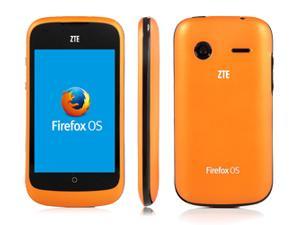
Here's what it looks like:


Here's the specs:

CPU 1.0 GHz Cortex-A5
Chipset Qualcomm MSM7225A Snapdragon
GPU Adreno 200
OS Firefox OS
Memory 512 MB ROM, 256 MB RAM
Support Micro SD Card, up to 32GB (No memory card include)
Screen 3.5" TFT 320 x 480 Pixels
TFT Capacitive Screen
Network 3G Network: HSDPA 850/1900
2G Network: GSM 850/900/1800/1900
Audio 3.5MM headphone jack
Supports MPEG-4 AAC (M4A), MP3, OGG and other formats
Video Supports H.264, MP4, ASP, WebM and other formats
Wlan Wi-Fi 802.11 b/g/n, dual-band
Camera Back 2 MP
Picture Formats Support JPEG, PNG, GIF, BMP and Other Formats
Dimensions 114 x 62 x 12.5 mm
Battery Li-Ion 1200 mAh battery

Package Include
1 x ZTE Open Firefox OS Mobile Phone
1 x Battery
1 x Micro USB Cable
1 x Charger
1 x personal hands-free headset (PHF) 

My Opinion (so far)

 I've owned several types of phones before and my initial impression was that it seems a bit similar to my iPhone 4. Round icons, swipe to left or right, one main button (no back button), and press on the background to float apps so you can move or delete them.

There's an app store and I'm busy loading up with apps and seeing what they have. Since Firefox OS is still new and still making big changes, I don't expect every app that I use on Android or Windows or Mac or Linux or iPhone or ...

In general it works, it didn't cost much, and I had a spare micro SD card and a spare SIM card.

You will need a SIM card for this phone. It is unlocked and you can't make a call unless you get a SIM card (standard size, like a postage stamp). You'll also need a micro SD card, but only if you want to store music or videos or pictures. There's also a slot in the back which I think will take micro SD cards, but I haven't tried it yet.

Problems

The phone doesn't feel as sturdy as my Galaxy Note II or my iPhone 4. But it is a lot cheaper, so I'm fine and so far I haven't broken it.

However, there is one problem that has surfaced, and that is that the updates from ZTE don't work and may even "brick" your phone, so don't do an update. I don't know where to check for the validity of updates, but I saw that these problems are mentioned on the Boot-to-Gecko mailing list.

But in general, I'm in love. I'll be reviewing games I get through the Marketplace and maybe even a few non-game apps that are cool.